


Subpilot
4.11.67K Reviews
App Specs
- Version
- 1.24.1
- Updated On
- License
- Free
- Downloads
- 100,000+
- Developer
- Linerios Limited
- Categories
- Finance
- Platform
- Android
Screenshots
 Analysis by AppCompare
I find subscription tracking most useful when I treat it as a review of recurring commitments, not as a promise that every payment will be handled automatically. That distinction matters with Subpilot: it can help bring subscriptions into view and make cancellation less of a chore, but I would still check important billing details before relying on any reminder or cancellation workflow. For anyone who has lost track of trial endings, monthly services, or unfamiliar charges, that practical focus is appealing.
Why subscription setup can feel less straightforward than it sounds
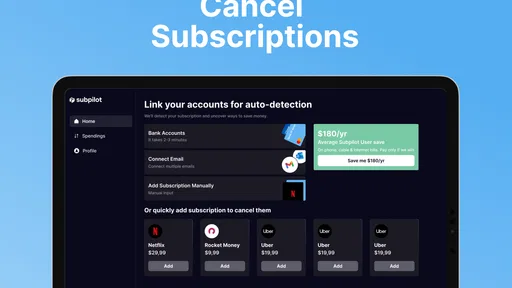
The first point where people may hesitate is connecting financial accounts or email. Linking them can help the app identify recurring services, but it also means the setup asks for a level of access that some people simply do not want to give a finance app. I would decide that comfort question before starting, rather than rushing through onboarding just to see a dashboard. If you prefer not to connect accounts, a manual list or a calendar reminder may suit you better.
Even with connections in place, subscription detection is best treated as a starting point rather than a complete inventory. A recurring charge can be hard to recognize if the billing name differs from the service name, and a subscription paid through another person, a prepaid balance, or a separate platform may not appear where you expect it. I would compare the app’s results with recent bank activity and the billing pages for services I know I use. That simple cross-check reduces the chance of assuming that “not listed” means “not active.”
There is also a small but important difference between spotting a charge and knowing its status. A payment may be annual, paused, recently changed, or associated with a plan you still need. Before cancelling anything, I would open the service’s own account page and check the renewal date, plan, and account owner. That extra minute is worthwhile if a shared household account or work-related subscription is involved.
Checks I would make before relying on reminders
Once the first list appears, I would review each entry rather than accepting every match as correct. Check the service name against the merchant on a statement, then make sure the amount and billing rhythm make sense. If a charge looks unfamiliar, search your email for a receipt or renewal notice before making a decision. This is a more reliable way to separate forgotten subscriptions from purchases that merely happen to repeat.
For trials, I would record the actual end date from the service’s own confirmation and keep a personal calendar alert as a backup. A reminder is only useful if the date is right and you notice it in time; it should not replace reading the trial terms. This is especially sensible when a trial started through an app store or another billing channel, since the place that manages the cancellation may differ from the service you use.
The app is free to download, but it includes in-app purchases ranging from $4.99 to $99.99 per item. I would look at the purchase details in the app before choosing anything and decide whether the paid option solves a real problem for me. If all I need is a short list of renewal dates, a notes app or calendar can do that without adding another ongoing commitment.
Worth Reading Before You Choose

EA SPORTS FC Mobile 26 Is a Bigger Football Game, but It Takes Time

Flipboard Shows What News Apps Must Do Beyond the Feed

Switching to Android Auto Means Rethinking Your Driving Routine

Google Calendar Makes a Crowded Week Easier to Manage

Ludo King Makes the Most of the Minutes Between Plans

Baby Panda World Brings Quick Play to Modern Phones, but Its Game Library Feels Busy
Recovering when a subscription is missing or cancellation stalls
If a subscription does not show up, I would first confirm that the relevant account connection is active and that the charge is actually recurring. Then I would check the original service’s billing page, receipts, and recent statement entries. Those steps help distinguish a detection issue from a subscription billed under a different account or payment route. I would avoid reconnecting accounts repeatedly without a clear reason; a quick comparison of the source records is usually the more useful next move.
When a cancellation request is involved, keep the confirmation from the service itself. A cancellation workflow can save time, but the outcome that matters is whether the provider confirms the plan will end and whether access or billing changes on the expected date. If the app’s process does not produce a clear confirmation, contact the provider through its official account or support channel and check the next statement. I would not assume that starting a request is the same as completing it.
For a shared subscription, it is worth checking who owns the account before trying to cancel. The person paying may not be the person using the service, and cancelling a family or household plan could affect others. I would discuss it first, then use the provider’s account settings to verify the result. That bit of coordination is less convenient than tapping a button, but it prevents a tidy budget from turning into an avoidable household surprise.
When the app may not be the cause
A missing reminder or unexpected charge does not automatically mean the tracker has failed. The merchant may bill under a parent company name, the service may renew annually rather than monthly, or a different account may be paying. I would compare the date and amount against receipts and the provider’s billing page before drawing conclusions. For charges that remain unfamiliar, the bank or payment provider is the right place to ask about the transaction itself.
Likewise, cancellation can depend on where the subscription was originally purchased. Some services direct customers to manage billing through the service, while others use a separate platform or account. If the cancellation option is unavailable in one place, check the purchase confirmation and the provider’s instructions rather than repeating the same request. The tracker can help organize the task, but it cannot replace the billing channel’s own rules.
Who gets the most value from this kind of workflow
I think Subpilot makes the most sense for someone who already pays for several digital services and wants one place to review recurring costs. It is particularly useful when the problem is not a lack of budgeting discipline but simply forgetting which services renew and when. A quick monthly review can turn a pile of small charges into decisions: keep the service, change the plan, or investigate whether it is still being used.
One realistic routine is to check the list after a statement arrives. I would flag services I have not used recently, verify the next renewal on the provider’s page, and cancel only after confirming that nobody else depends on the account. Then I would check again after the next billing cycle to make sure the expected change took effect. This is more dependable than trying to cancel everything in one hurried session, especially when several providers have different processes.
People who prefer not to connect financial accounts, have only one or two recurring services, or already maintain a reliable spreadsheet may not gain much. The same goes for anyone expecting the app to negotiate prices, decide which services are worth keeping, or guarantee a cancellation outcome without checking the provider. I would choose a simple calendar for occasional renewals and reserve a dedicated tracker for a subscription list large enough to be genuinely hard to manage.
How it compares with a calendar, spreadsheet, or bank review
A calendar is the simplest alternative: it can remind you of a date you enter, but it will not automatically help assemble a subscription inventory. A spreadsheet gives you more control over notes, household ownership, and custom categories, though it depends on you keeping it current. A bank app is useful for confirming what was charged, but a list of transactions is not always the same as a clear view of active services or cancellation tasks.
The trade-off with a dedicated manager is convenience against trust and verification. Automatic discovery can reduce the effort of building a list, while account linking may feel like too much access for someone who wants only occasional reminders. I would not treat any one option as universally better: use the tracker if the time saved is worth the setup, and choose manual records if you value direct control more than automation.
A closer look at Subpilot’s place in finance apps
Subpilot is a finance app from Finelo Limited focused on managing recurring subscriptions. It is free to install, has an Everyone age rating, and is at version 1.13.1, with a minimum operating system requirement of 8.0. Its average rating is 4.0 from 767 ratings, and it has 10K+ installs. Those figures suggest an established audience, though they cannot tell me whether a particular account connection or cancellation request will work smoothly for every user.
The app’s appeal is more specific than a general budgeting tool: it is designed around spotting and handling subscriptions rather than mapping every part of your household finances. That narrower scope can be a benefit if you only want to regain control of recurring services. It is less compelling if you want a complete spending plan, debt tracking, or broad financial reporting; in that case, a fuller budgeting app may be a better fit, with a calendar or subscription list serving as a focused supplement.
One useful habit is to treat the app as a prompt for decisions rather than as an authority on what to cancel. For each service, I would ask whether I used it recently, whether another household member relies on it, and whether the next renewal is worth the cost. That turns a detection list into an actual spending review. It also avoids the common mistake of cancelling a low-cost service automatically while overlooking a more expensive plan that has quietly become unnecessary.
Getting Started with Subpilot
First things first, let’s talk onboarding. I downloaded the app with a skeptical mind—after all, could an app really manage all my subscriptions without me lifting a finger? But I was pleasantly surprised by how easy it was to set up. The user interface is sleek and intuitive, perfect for someone like me who isn’t exactly tech-savvy. All it took was a few taps, and I was ready to dive in.
You link your bank account and email, and voilà, Subpilot magically pulls up a list of all your active subscriptions. It’s like having your very own personal assistant that doesn’t ask for coffee breaks! I was amazed at how quickly it identified subscriptions I had completely forgotten about.
Features That Stand Out
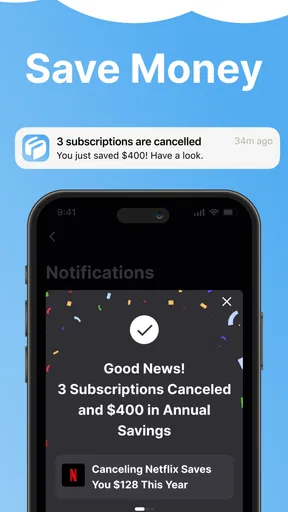
Let’s chat about what makes Subpilot stand out from the crowd. One of my favorite features is the notification system. You get timely reminders about upcoming charges, which is a lifesaver if you’re like me and tend to forget when your free trials are ending. No more unexpected charges sneaking up on you!
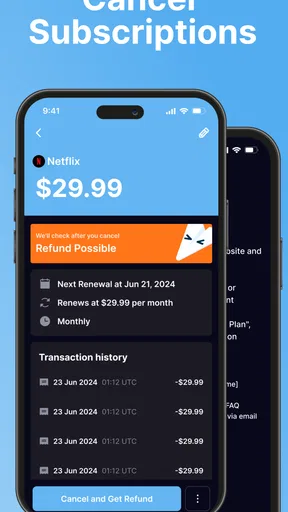
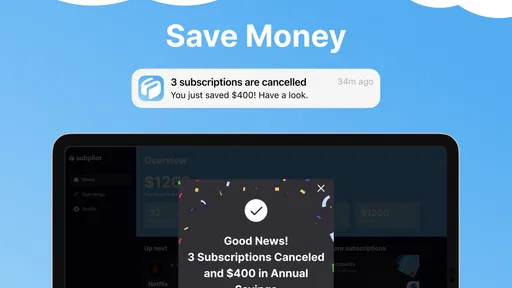
Another cool feature is the cancellation service. If you decide you no longer want a subscription, the app can handle the cancellation process for you. This alone is worth its weight in gold. We all know how some companies love to hide the cancel button in a maze of menus!
User Experience: Smooth Sailing
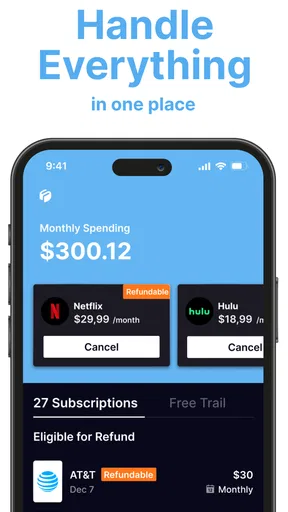
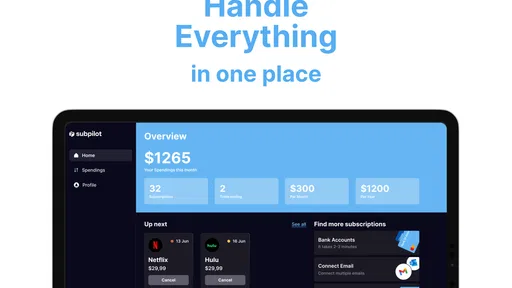
In terms of user experience, Subpilot really nails it. The dashboard is clean and easy to navigate, showing you all your subscriptions at a glance. I also appreciate the detailed analytics that break down your spending habits. It’s eye-opening to see just how much those little subscriptions can add up over time.
The app also supports multiple currencies, which is a huge plus if you’ve got international subscriptions. And if you’re worried about security, rest easy. Subpilot uses bank-level encryption to keep your financial data safe and sound.
The Final Verdict
So, what’s the final word on Subpilot? Honestly, I’m a fan. It’s a handy tool for anyone looking to take control of their subscriptions and avoid unwanted charges. The ease of use, coupled with its powerful features, make it a no-brainer for anyone juggling multiple subscriptions.
While it’s not perfect—like any app, it has its quirks—it’s pretty darn close. If managing subscriptions has been a thorn in your side, give Subpilot a try. You might just find it’s the app you’ve been missing.
Ready to streamline your subscriptions? Check out the download links below and take Subpilot for a spin. Trust me, your wallet will thank you!
Pros
- User-friendly interface for easy navigation.
- Customizable settings to suit preferences.
- Efficient syncing across multiple devices.
- Regular updates enhance functionality.
- Comprehensive help and support resources.
Cons
- Occasional bugs disrupt user experience.
- Limited offline functionality available.
- In-app purchases can be pricey.
- Notifications can be overwhelming.
- Requires stable internet connection.
FAQs for Subpilot
What is Subpilot and how does it work?
Subpilot is a subscription management app designed to help users keep track of their active subscriptions and manage payments effectively. Once installed, the app allows you to input your subscription details manually or sync with your email for automatic detection. It provides reminders for upcoming payments and offers insights into your spending patterns.
Is Subpilot available on both Android and iOS platforms?
Yes, Subpilot is available for download on both Android and iOS platforms. Users can find the app on the Google Play Store for Android devices and the Apple App Store for iOS devices. Make sure to check the compatibility of your device with the app's requirements before downloading.
Does Subpilot offer any privacy and security features?
Subpilot prioritizes user privacy and data security. The app uses encryption to protect your sensitive information and does not store personal data on its servers. Additionally, users have the option to secure the app with a passcode or biometric authentication for added protection.
Are there any costs associated with using Subpilot?
Subpilot offers a free version with basic features, but for more advanced functionalities, users can opt for a premium subscription. The premium version includes additional features such as detailed spending analysis and more frequent notifications. Pricing details can be found within the app or on the app's official website.
How user-friendly is Subpilot for managing multiple subscriptions?
Subpilot is designed to be user-friendly, with an intuitive interface that makes managing multiple subscriptions straightforward. The app allows you to categorize and label subscriptions, making it easy to view and manage them. With its detailed dashboard, users can quickly assess their subscription status and upcoming payments.


